How to make PS1-style music in your DAW
PlayStation 1 soundtracks have a sound you can pick out in a few notes: slightly grainy samples, a soft top end and a lot of reverb. Most of it came from what the console's sound chip could and couldn't do. Here's what those limits were, and how to put them back into your own music in any DAW, with free tools or with a plugin built for it.
By Aiden Shihadeh, developer of simpleSPU · Published 8 October 2026
Quick answer
| Where the sound comes from | Sampled instruments squeezed into 512 KB of sound memory and played by the console's sound chip, the SPU |
|---|---|
| The main ingredients | Low sample rates, 4-bit ADPCM grit, a soft top end, one big reverb, and no more than 24 notes at once |
| With free tools | A sampler, a downsampler or bitcrusher, a low-pass filter and a dark reverb on a shared bus |
| With a plugin | simpleSPU models the chip itself: ADPCM samples, Gaussian interpolation and the chip's reverb |
| Ripped game samples? | Fine for practice, not for music you release. They belong to the games' publishers. |
What made PS1 music sound like that
Many PS1 games played their music the way a MIDI file plays: the console sequenced notes live, using a small bank of instrument samples loaded into the sound chip's memory. (Others streamed finished recordings from the disc, and those sound like any CD.) The sequenced kind is what people usually mean by "the PS1 sound", and its character comes from the chip's limits, which are well documented in the psx-spx hardware reference:
- 512 KB of sound memory. Every instrument for a scene had to fit, so composers used short samples, short loops and sample rates well below CD quality.
- 4-bit ADPCM. Samples were stored in a compressed 4-bit format, in 16-byte blocks of 28 samples. It adds a faint, noisy grain, most audible on quiet, sustained sounds.
- Gaussian interpolation. When a sample is played at another pitch, the chip smooths it with a four-point Gaussian curve, which rolls off the high end. That's a big part of why PS1 music sounds warm rather than harsh.
- 24 voices. The chip could play 24 sounds at once, for the whole song: melody, chords, bass and drums together.
- One reverb, at half rate. There was a single hardware reverb, and each voice was either sent to it or not. It ran at 22.05 kHz, half the output rate, which makes the tail dark and a little grainy.
One thing to keep in mind: the output was full 44.1 kHz. The lo-fi part is in the samples and the reverb, so don't crush the whole mix to get it.
Six steps to the sound in any DAW
These work in Ableton Live, FL Studio, Logic Pro, Reaper or any other DAW, with the sampler and effects it comes with.
- Pick a small palette of sampled instruments. Strings, choirs, soft pads, electric pianos, bells, fretless or synth bass, and a breakbeat or a small drum kit. Six to ten instruments for a whole track is plenty, and it's closer to how the music was actually written.
- Lower the sample quality before it reaches the mixer. Resample your instrument samples to 22.05 kHz or lower, or put a downsampler on each instrument. A bitcrusher set gently (around 10 to 12 bits) adds grain, but go easy: ADPCM noise is softer than the harsh fizz of a heavily crushed signal.
- Soften the top end. A gentle low-pass filter on the instruments, somewhere around 8 to 12 kHz, stands in for Gaussian interpolation.
- Write within 24 voices. Count the notes playing at any moment, drums included. The limit pushes you towards simple chords, a single bass line and tight drum programming, which is a big part of the style.
- Put everything through one reverb. Use a single reverb on a send bus rather than one per track, choose a long room or hall, cut its highs, and send most instruments to it. Keep the bass and kick mostly dry so the low end stays clear.
- Keep loops short and envelopes simple. Sustained sounds should loop a short section of the sample, so the loop is just audible. Use plain attack, decay, sustain and release shapes rather than complex modulation.
Running out of voices? Shorten the release on your chords and let the reverb carry the tail instead. It frees voices up fast.
Doing it with simpleSPU
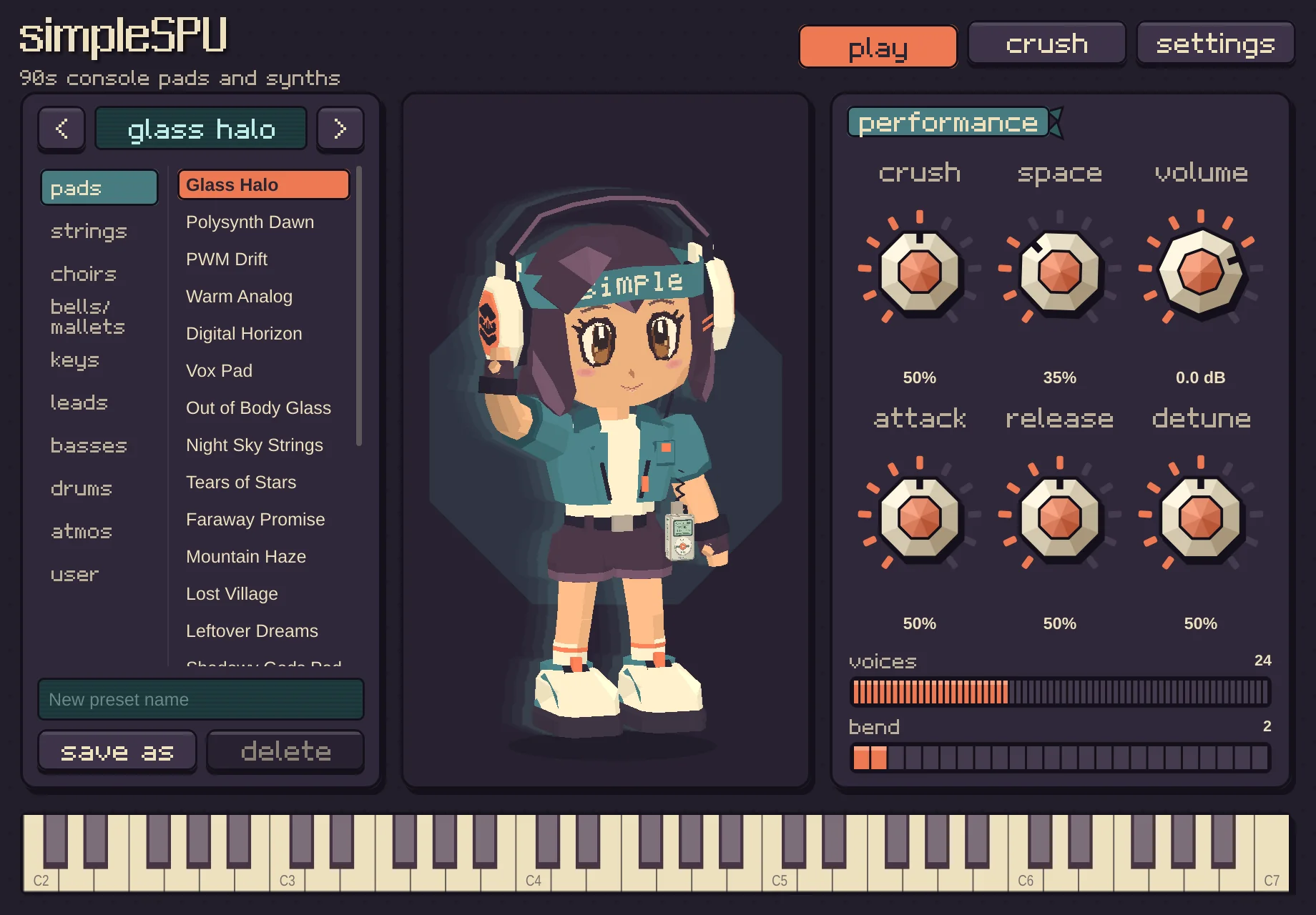
simpleSPU is a synth and effect plugin modelled on the PS1's sound chip, so steps 2, 3 and 5 happen inside it:
- Load simpleSPU on a MIDI track. It's a VST3 plugin on Mac, Windows and Linux, and an AU on Mac.
- Choose a preset. Around 100 presets in pads, strings, choirs, bells, keys, leads, basses, drums and atmospheres. Every sample is stored as 4-bit ADPCM and pitched with Gaussian interpolation, as on the chip.
- Pick a reverb. Nine reverb types, from Room and Hall to Space Echo, built from the chip's published settings and run at half rate.
- Use the Crush knob for more grit. Each preset starts at 50%. Turn it up for a rougher, lower-bit sound.
- Run other tracks through simpleSPU FX. The included effect puts drums, vocals, guitars or a whole mix through the same engine and reverb, so recorded parts sit with the instruments.
Every sample in simpleSPU was made by us or comes from openly licensed recordings, so you can use it in music you release.
Common questions
What sample rate did the PS1 use?
The sound chip mixed and output audio at 44.1 kHz, but each instrument sample could be stored at any rate. To fit 512 KB, they were usually much lower than 44.1 kHz. The reverb ran at 22.05 kHz.
Can I make PS1-style music with free plugins?
Yes. A sampler, a downsampler, a low-pass filter and a reverb get you most of the way, as in the six steps above. A plugin that models the chip saves the setup and gets the ADPCM grain and the reverb's character closer.
Can I use SoundFonts made from PS1 games?
You can play them in a SoundFont player such as simpleSF2 (see what an SF2 file is), but most are made from ripped game audio, so they aren't safe to use in music you release.
Is simpleSPU an official PlayStation product?
No. simpleSPU is an original instrument and effect inspired by PlayStation-era music. It isn't affiliated with Sony or PlayStation.
Which DAWs does simpleSPU work in?
Any host that loads VST3 plugins, or AU on macOS, such as Ableton Live, FL Studio, Logic Pro, Reaper and Bitwig Studio.