How to use SF2 SoundFonts in GarageBand
GarageBand has no way to import a SoundFont, and unlike Logic Pro it has no Sampler to convert one. It does load Audio Unit instruments, though, so a SoundFont plugin plays SF2 files in GarageBand on any Mac. There's also a basic built-in route, with limits worth knowing about.
By Aiden Shihadeh, developer of simpleSF2 · Updated 13 October 2026
Quick answer
| Can GarageBand open SF2 files? | Not directly. There's no SoundFont import and no Sampler. |
|---|---|
| Easiest way to play one | Load simpleSF2 as an Audio Unit instrument on a software instrument track. |
| Plugin format | Audio Unit only. GarageBand doesn't load VST3. |
| Built-in option | Apple's DLSMusicDevice can play a bank, but has no preset list. |
| GarageBand on iPhone or iPad | Not covered here: simpleSF2 runs on Mac, Windows and Linux. |
Load a SoundFont in GarageBand with simpleSF2
simpleSF2 is a SoundFont player plugin for SF2 and SFZ files. Its macOS installer adds an Audio Unit that GarageBand can load on any software instrument track, and every bank and preset in the file stays in one list.
- Download simpleSF2 and run the macOS installer. It installs the Audio Unit for you.
- Open GarageBand, choose Track → New Track, pick Software Instrument and click Create.
- Press B to open Smart Controls at the bottom of the window. On the left, under Keyboard Sensitivity, click Plug-ins to expand it. (If you don't see it, click the ⓘ Inspector button first.)
- The top slot in Plug-ins is the instrument and shows the current sound. Hover over it, click the small arrows on its right, and choose AU Instruments → simpleSoundbank → simpleSF2 → Stereo.
- Click Import SF2/SFZ in the plugin window and pick your file, or drag the file from Finder onto the plugin.
- Pick a bank and a preset, then play with a MIDI keyboard or Window → Show Musical Typing. GarageBand saves the library and preset with your project.
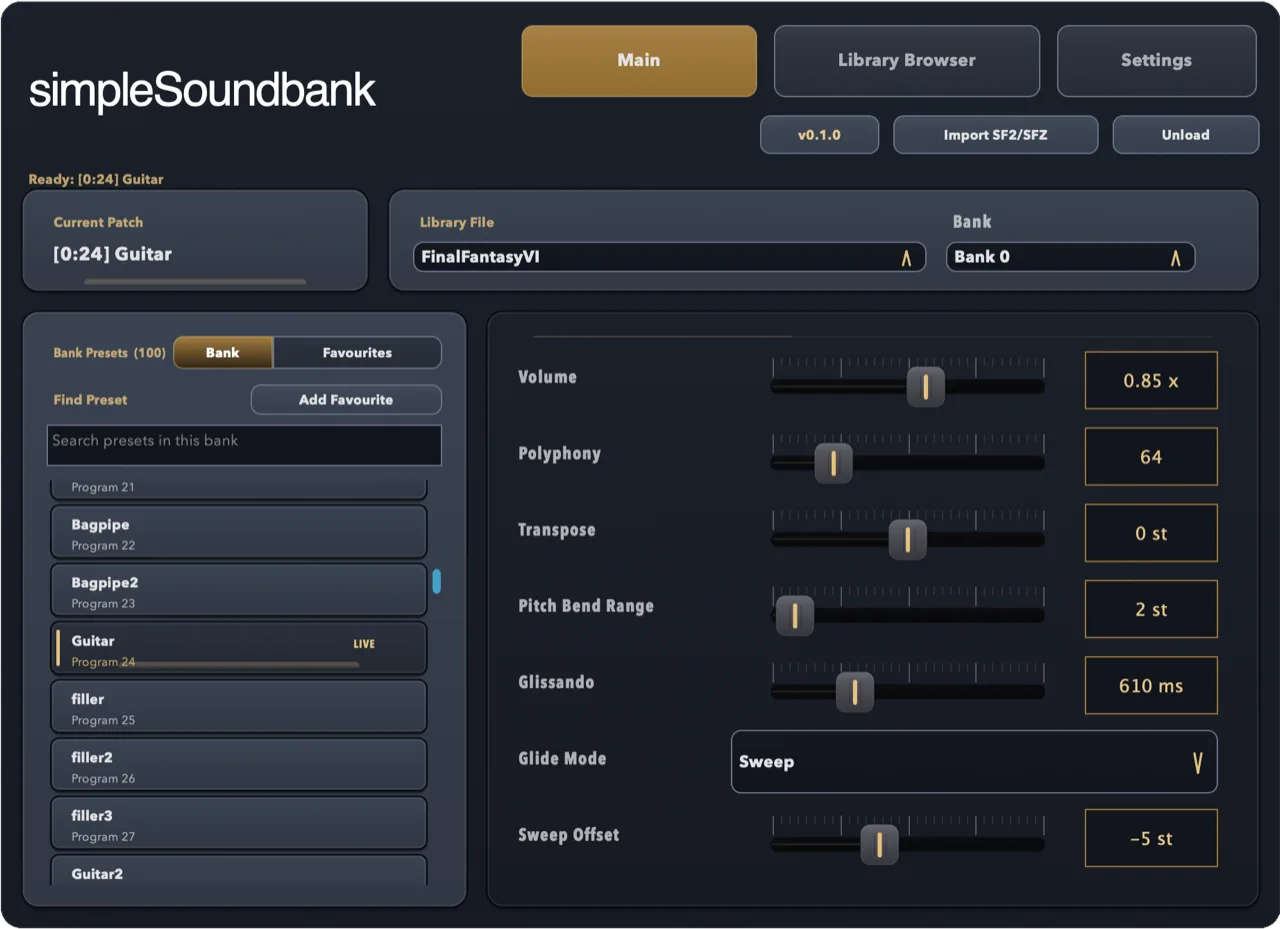
To use another preset from the same SoundFont on a second track, add a new software instrument track and load simpleSF2 again. The file you imported stays in the plugin's library, so you don't need to import it twice.
The built-in way: Apple's DLSMusicDevice
macOS includes a basic General MIDI player, DLSMusicDevice, that can read SoundFonts. It works, but it's clumsy for anything beyond a quick test.
- In Finder, choose Go → Go to Folder, open
~/Library/Audio/Sounds/Banks(create the folder if it isn't there) and copy your.sf2file into it. A lowercase.sf2extension is safest. - In GarageBand, create a software instrument track, open Plug-ins in Smart Controls, and click the arrows on the top (instrument) slot.
- Choose AU Instruments → Apple → DLSMusicDevice → Stereo, then pick your file from the Sound Bank menu.
Things to know before you rely on it:
- No preset list. DLSMusicDevice doesn't show the presets inside the bank, so you hear the bank's first program and have no easy way to switch.
- No sound shaping. There are no envelope, filter or tuning controls.
- SF2 only. It can't read SFZ instruments.
If you want to browse a bank's presets, play SFZ files or shape the sound, a SoundFont plugin is the better route.
If simpleSF2 doesn't show up in GarageBand
- Open GarageBand → Settings → Audio/MIDI and make sure Enable Audio Units is ticked.
- Quit and reopen GarageBand after installing. It only checks for new Audio Units when it starts.
- Check that
simpleSF2.componentis in/Library/Audio/Plug-Ins/Components. If it isn't, run the installer again. - Still stuck? Email support@simplesoundbank.com.
Common questions
Can GarageBand open SF2 files?
Not directly. GarageBand has no SoundFont import, so you play SF2 files through an Audio Unit instrument such as simpleSF2, or through Apple's basic DLSMusicDevice.
Does GarageBand support VST plugins?
No. GarageBand on Mac loads Audio Unit plugins only, which is why simpleSF2's macOS installer includes an Audio Unit.
Is there a free SoundFont player for GarageBand?
simpleSF2 is free to download and use with one library per instance. A one-time £9.99 unlock adds multiple libraries, 16-channel multitimbral mode, and reverb and chorus.
Will my GarageBand project open in Logic Pro?
Yes. Logic Pro opens GarageBand projects, and simpleSF2 loads there as the same Audio Unit. See SoundFonts in Logic Pro.