How to use SF2 SoundFonts in Logic Pro
Logic Pro can't open an SF2 file directly on an instrument track. You can either convert it into Logic's own Sampler, or play it as it is with a SoundFont plugin. Here are both ways, and when each one makes sense.
By Aiden Shihadeh, developer of simpleSF2 · Updated 7 October 2026
Quick answer
| Can Logic open SF2 files? | Not directly on a track. Its Sampler converts them into Sampler instruments. |
|---|---|
| Built-in route | Copy the .sf2 into ~/Music/Audio Music Apps/Sampler Instruments, then pick it in Sampler. |
| Whole General MIDI banks | Sampler splits a bank into separate instruments. A SoundFont plugin keeps every preset in one list. |
| Play the SF2 as it is | Load simpleSF2 as an Audio Unit instrument. |
| GarageBand | The same Audio Unit works there too. |
Which way should you use?
- Logic's Sampler is built in and free. It suits a single instrument you want to keep and edit inside Logic.
- A SoundFont plugin plays the SF2 file itself, so a whole bank of presets stays browsable in one place. It suits General MIDI banks, game and retro SoundFonts, and trying lots of sounds quickly.
Way 1: Import the SF2 into Logic's Sampler
Logic converts SoundFont 2 files into Sampler instruments when you put them in its Sampler Instruments folder.
- In Finder, choose Go → Go to Folder and open
~/Music/Audio Music Apps/Sampler Instruments. - Copy your
.sf2file into that folder. If you keep your SoundFonts elsewhere, put an alias to them there instead. - In Logic, create a software instrument track and load Sampler in its Instrument slot.
- Open Sampler's settings menu at the top of the plugin window and choose your SoundFont from the list. Logic converts it the first time you load it.
Things to know before you rely on it:
- Banks are split up. A SoundFont that holds a whole bank becomes a
.bkfolder of separate Sampler instruments, and each track loads one of them. - Logic plays a copy. The samples are extracted into
~/Music/Audio Music Apps/, and Logic plays that converted copy rather than the SF2 file itself. - Only SF2. This is the route for SoundFont 2, DLS and Gigasampler files. See Apple's Logic Pro guide for the details.
Way 2: Play the SF2 directly with simpleSF2
simpleSF2 is a SoundFont player plugin that runs in Logic as an Audio Unit instrument. It loads SF2 and SFZ files as they are, with every bank and preset in one list. The free version plays one imported library per instance.
- Download simpleSF2 and run the macOS installer. It installs the AU and VST3 plugins for you.
- Open Logic Pro and create a Software Instrument track.
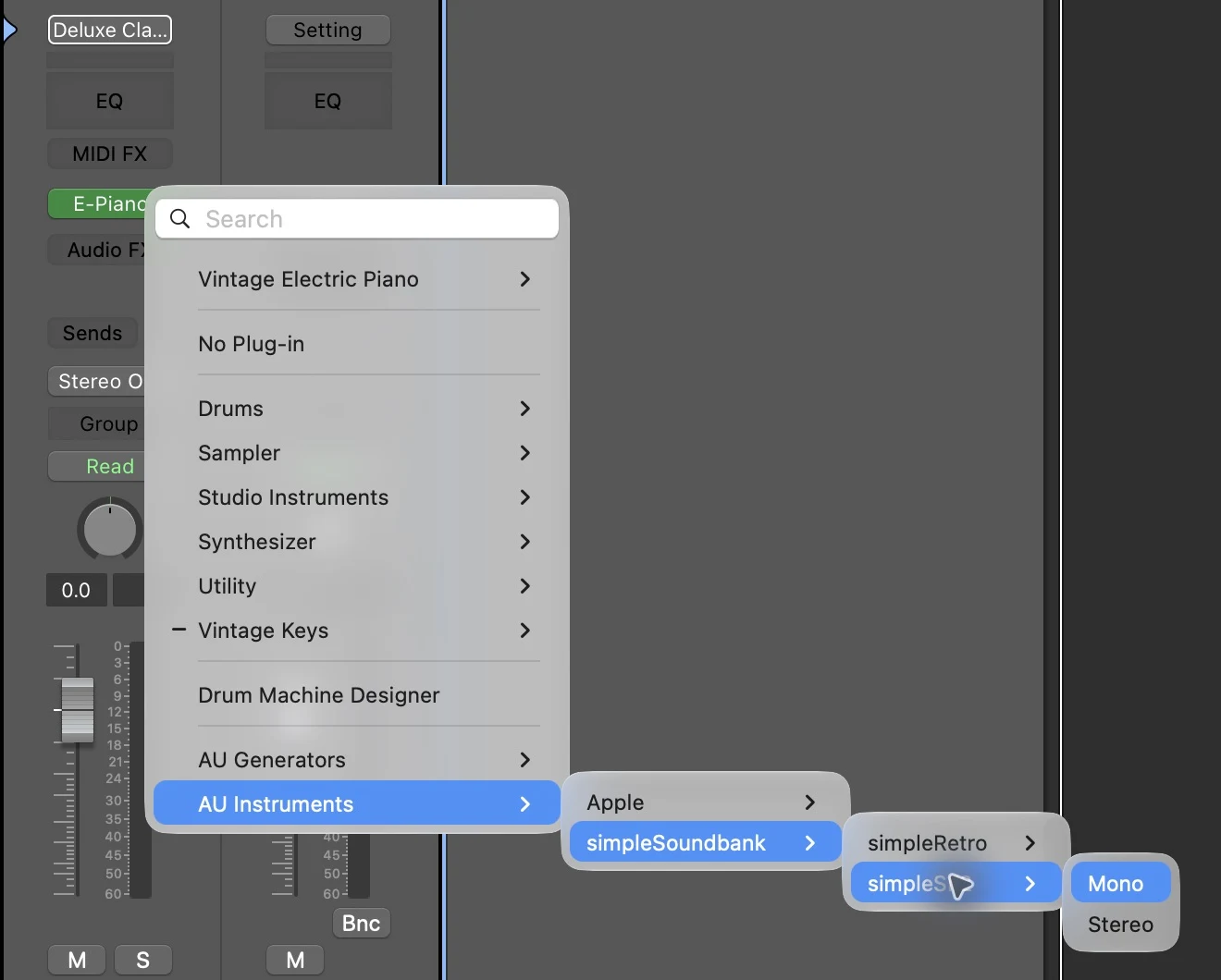
- Click the track's Instrument slot and choose AU Instruments → simpleSoundbank → simpleSF2 → Stereo.
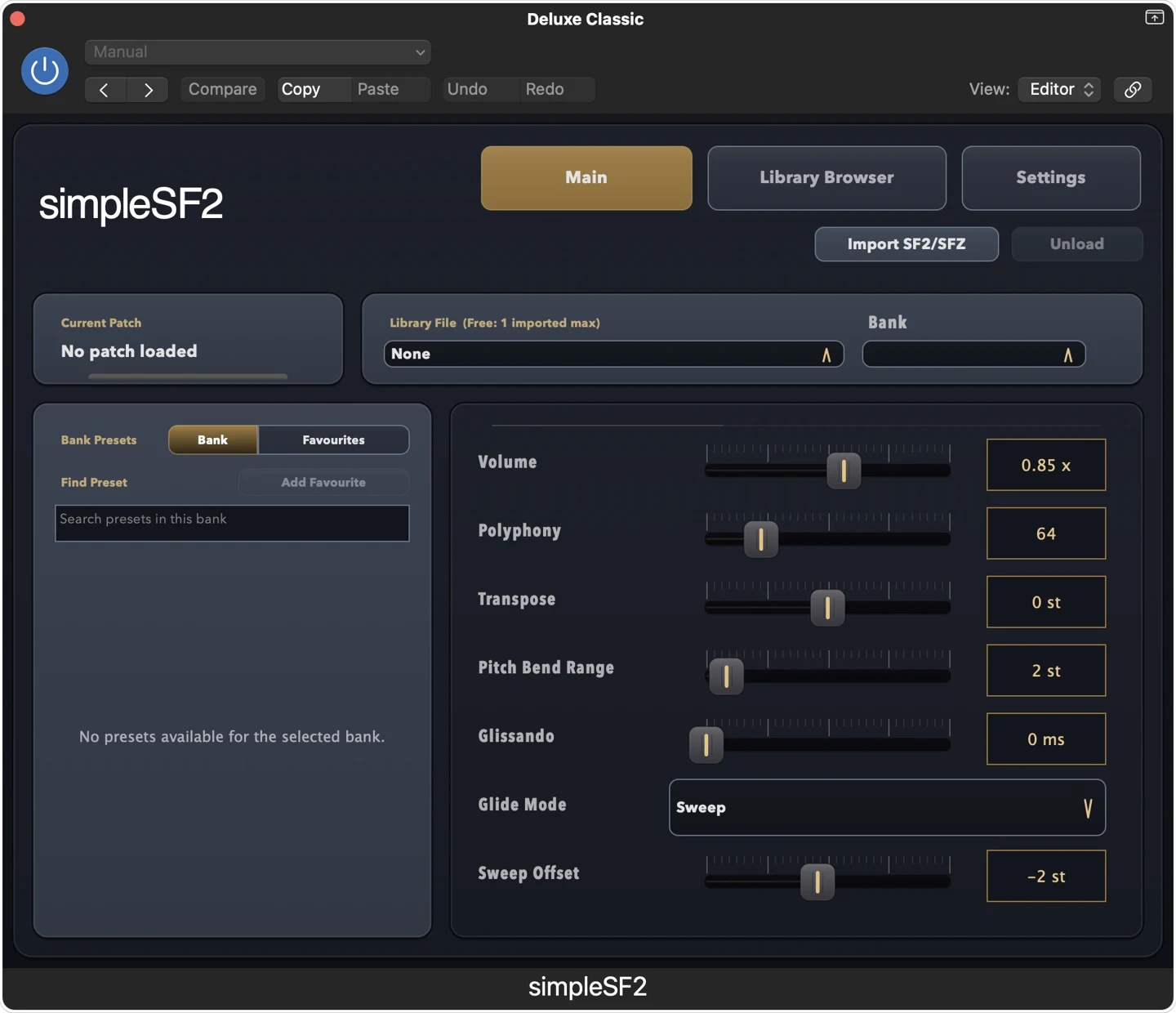
- Click Import SF2/SFZ in the plugin and pick your file, or drag the file from Finder onto the plugin window.
- Pick a bank and a preset, then play. Logic saves the library, preset and settings with your project.
The same AU works in GarageBand: choose it under Plug-ins → Audio Units on a software instrument track.
If the plugin doesn't show up in Logic
- Quit and reopen Logic after installing. Logic only scans for new Audio Units at launch.
- Open Logic Pro → Settings → Plug-in Manager, find simpleSF2 under simpleSoundbank, and make sure it's ticked. If it failed validation, select it and click Reset & Rescan Selection.
- Still stuck? Email support@simplesoundbank.com.
Common questions
Can Logic Pro open SF2 files?
Not directly on a track. Logic's Sampler converts SF2 files into its own format when you put them in the Sampler Instruments folder, or you can use a SoundFont plugin that plays SF2 files without converting them.
Can I use SFZ files in Logic?
simpleSF2 loads SFZ instruments the same way it loads SF2 files, with no conversion step.
Is there a free SoundFont player for Logic Pro?
Yes. simpleSF2 is free to download and use with one library per instance. A one-time £9.99 unlock lets you import and switch between multiple libraries.