How to use SF2 SoundFonts in FL Studio
FL Studio no longer comes with a dedicated SoundFont player. You can import an SF2 file into DirectWave, FL Studio's sampler, or play it as it is with a SoundFont plugin in the Channel Rack. Here are both ways, and when each one makes sense.
By Aiden Shihadeh, developer of simpleSF2 · Updated 7 October 2026
Quick answer
| Can FL Studio open SF2 files? | Only by importing them into the full DirectWave. The free DirectWave Player can't. |
|---|---|
| What the import keeps | Key and velocity ranges and loop points. Filter, chorus and reverb settings are lost. |
| Fruity Soundfont Player | Discontinued with FL Studio 20.5. |
| Play the SF2 as it is | Load simpleSF2 in the Channel Rack. |
| Plugin format | VST3 on Windows and Mac |
Which way should you use?
- DirectWave comes with FL Studio. It suits a single instrument you want to turn into a DirectWave patch and edit inside FL Studio.
- A SoundFont plugin plays the SF2 file itself, so a whole bank of presets stays browsable in one place. It suits General MIDI banks, game and retro SoundFonts, and trying lots of sounds quickly.
Way 1: Import the SF2 into DirectWave
DirectWave can import SoundFont 2 files and turn their programs into DirectWave patches.
- Click + at the bottom of the Channel Rack and add DirectWave.
- Right-click the Open icon to the left of the preset selector at the top of DirectWave, or right-click the Program window, to open the importer.
- Choose your
.sf2file. If it holds more than one program, DirectWave asks which ones to load. - Save the result as a DirectWave patch if you want to reuse it in other projects.
Things to know before you rely on it:
- You need the full DirectWave. The free DirectWave Player only opens DirectWave's own patches, so it can't import SF2 files.
- Some sound is lost. DirectWave imports key and velocity ranges and loop points, but not the SoundFont's filter, chorus or reverb settings.
- Fruity Soundfont Player is gone. Older versions of FL Studio had a SoundFont player built in. Image-Line discontinued it with FL Studio 20.5, so projects that used it may no longer load it. See the DirectWave manual for the importer's details.
Way 2: Play the SF2 directly with simpleSF2
simpleSF2 is a SoundFont player plugin that runs in FL Studio as a VST3 instrument on Windows and Mac. It loads SF2 and SFZ files as they are, with every bank and preset in one list. The free version plays one imported library per instance.
- Download simpleSF2 and run the installer. On Windows
it puts the VST3 plugin in
C:\Program Files\Common Files\VST3, where FL Studio looks for plugins. - In FL Studio, open Options → Manage plugins and click Find installed plugins.
- Find simpleSF2 in the list and click its star to make it a favourite, so it shows up in the Channel Rack's add menu.
- Click + at the bottom of the Channel Rack and choose simpleSF2. You can also drag it in from Plugin database → Installed → Generators in the Browser.
- Click Import SF2/SFZ in the plugin and pick your file, or drag the file onto the plugin window.
- Pick a bank and a preset, then play it from the Piano roll or a MIDI keyboard. FL Studio saves the library, preset and settings with your project.
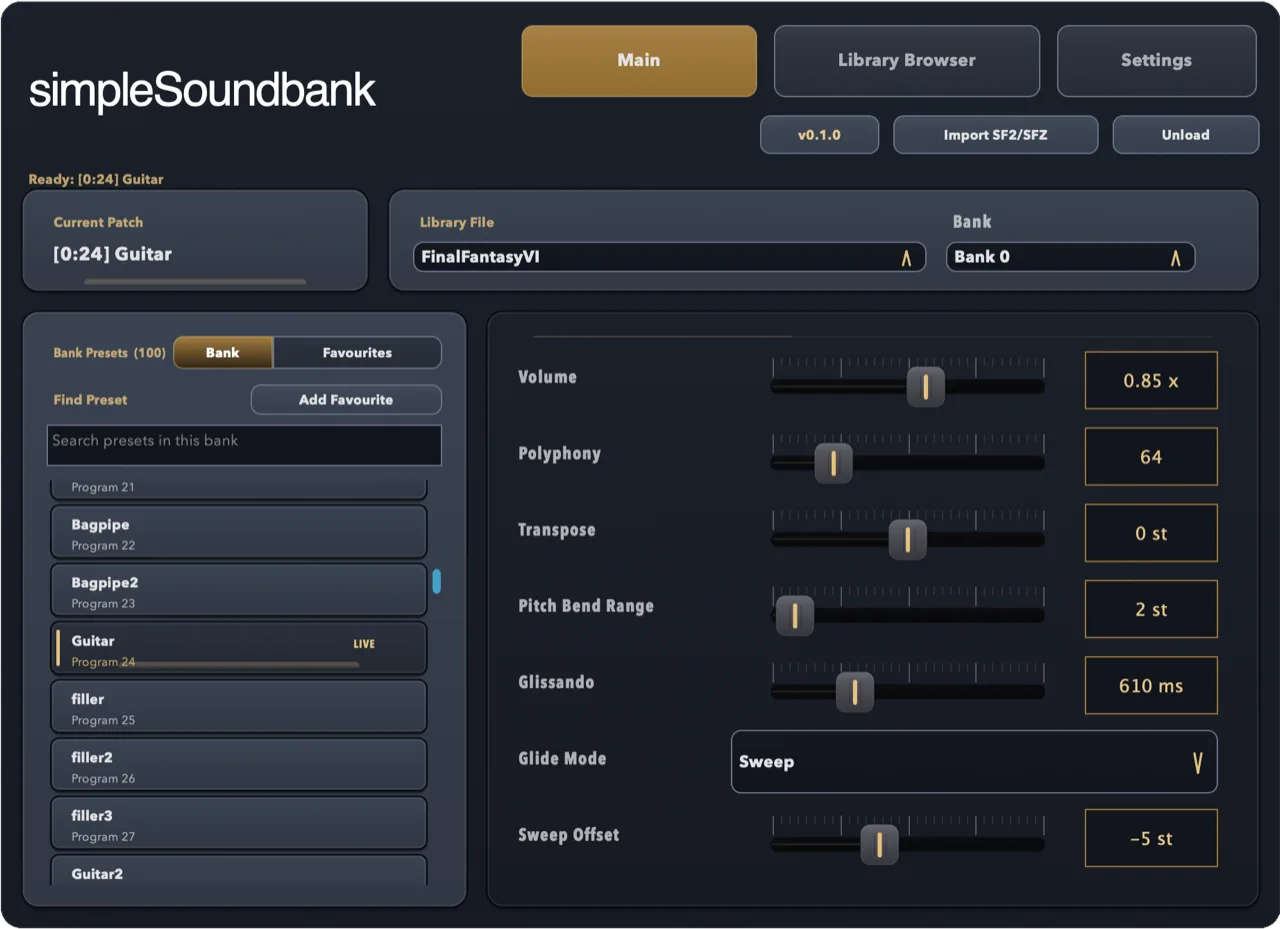
To use several SoundFonts at once, add one simpleSF2 per channel, each with its own library and preset.
If the plugin doesn't show up in FL Studio
- Open Options → Manage plugins, tick Verify plugins and click Find installed plugins again.
- Check that the plugin search paths in the same window include the standard VST3 folder.
On a Mac that's
/Library/Audio/Plug-Ins/VST3. - Still stuck? Email support@simplesoundbank.com.
Common questions
Can FL Studio open SF2 files?
Not on its own any more. The full version of DirectWave can import SF2 files into its own patch format, or you can use a SoundFont plugin that plays SF2 files without converting them.
What happened to Fruity Soundfont Player?
Image-Line discontinued it with FL Studio 20.5 and pointed users to DirectWave instead. A third-party SoundFont plugin is the closest replacement if you want to keep whole banks in one place.
Is there a free SoundFont player for FL Studio?
Yes. simpleSF2 is free to download and use with one library per instance. A one-time £9.99 unlock lets you import and switch between multiple libraries.